Pajero Central Screen Mini Dashboard
Table of contents Link to heading
Introduction Link to heading
This page is the project-level view of my ESP32-S3 touchscreen inclinometer build. The detailed implementation and architecture are described in previous posts:
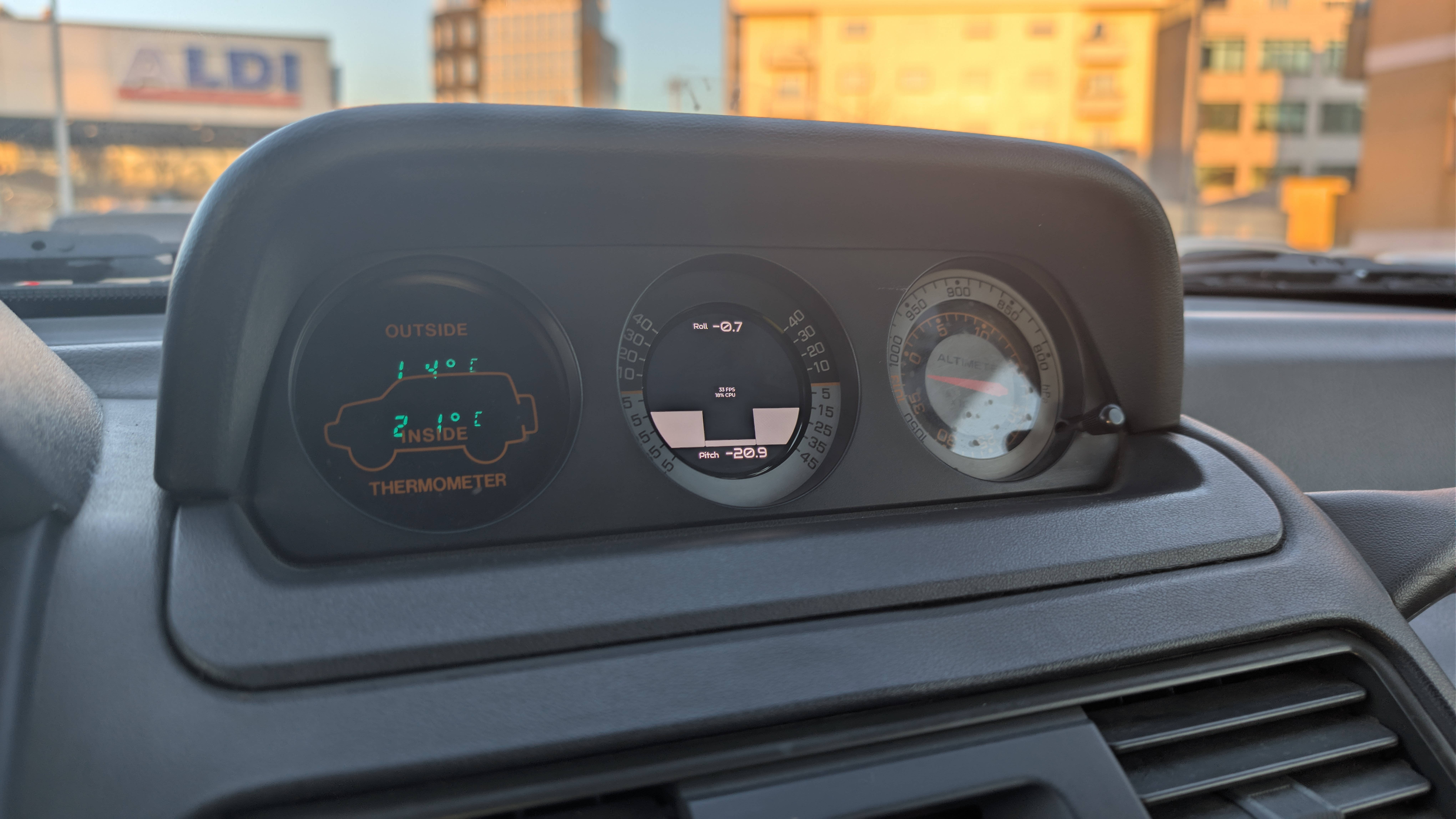
Final Installation in the Pajero
In short, this project turns the old inclinometer into a compact HMI platform: an inclinometer first, but designed from day one to host additional telemetry and interface features. As you know, scope creep is an ongoing struggle with any project, and this one is no exception; my write-up of the project doesn’t mean I will stop developing it — it just means that I have reached a point where I can confidently say I have a PoC that works.
Software Architecture Link to heading
The firmware is built on a modular, real-time architecture combining ESP-IDF, LVGL, and custom C++23 components for embedded safety and extensibility.
I built this article using the SW version CarTSmD-v1.0.0, further upgrades to the software will be documented either in posts here or directly in git.
System Design Philosophy Link to heading
The architecture follows embedded systems best practices:
- Modular autonomy: Each component manages its own resources and lifecycle
- Loose coupling: Components communicate via queues and callbacks, not direct dependencies
- Single responsibility: Display handles UI, WiFi handles network, OTA handles updates
- Thread-safe data sharing: Mutex-protected shared state and non-blocking queues for concurrent access
- SOLID principles: Encapsulation and dependency injection eliminate tight coupling; avoid code smells like god objects, feature envy, and long methods by keeping components focused and boundaries clear
Core Components & Responsibilities Link to heading
System (Orchestrator) Link to heading
Central coordinator that manages component lifecycle, initialization sequencing, and event wiring.
Initialization Chain:
Diagnostics → Display → QMI Interface → WiFi Manager → OTA Updater (registered)
Key Responsibilities:
- Queue creation and management for inter-component IPC
- Callback registration for cross-module events
- Component startup synchronization
Display Module Link to heading
Manages LCD hardware, LVGL rendering, and touch input in a dedicated real-time task.
Technical Specs:
- Display: 466×466 pixel round LCD (SH8601 controller)
- Interface: QSPI @ ~40 MHz (pins: CS=12, DATA0-3=4-7, CLK=38)
- LVGL Task: Priority=2, Stack=4 KB, adaptive refresh (1-500ms)
- Touch: I2C CST92xx on GPIO14/15 (SCL/SDA), 10ms polling
- DMA Buffers: Double-buffered draw buffers (1/4 screen height each)
- Thread Safety: FreeRTOS mutex (
lvgl_mux) protects all LVGL API calls
Data Reception Pattern:
xQueueReceive(RollPitchQueue_, &data, 0)— Sensor data (non-blocking)xQueueReceive(WifiQueue_, &data, 0)— Network state (non-blocking)- Both using
xQueueOverwrite()ensure the Display always has the latest values
Sensor Interface (QMI8658) Link to heading
High-priority real-time sensor task for IMU data collection and roll/pitch calculations.
Technical Specs:
- Priority: 10 (highest in application, higher than LVGL)
- Polling Interval: 40 ms (25 Hz update rate)
- Sensor: QMI8658 (I2C @ 100 kHz, addr=0x6B)
- Range: 4G accelerometer, 500 DPS gyroscope
- Calculations: Roll/Pitch from accelerometer components via
atan2() - Queue Output:
xQueueOverwrite(RollPitchQueue_)for non-blocking Display access
WiFi Manager Link to heading
Network discovery, credential management, and connection state tracking.
Technical Specs:
- Priority: 2, Stack: 4 KB
- Polling Cycle: 1 second WiFi scan/status check
- Features:
- Multi-network scanning with RSSI deduplication
- Auto-connect to known networks (credentials from
Secrets.hpp) - NVS-based credential persistence
- Atomic connection state flags
- Thread Safety:
std::lock_guard<std::mutex>for network list access - Queue Output:
WifiManagerPipelinestruct containing SSID list and connection status - Event Integration: ESP-IDF event loop callbacks for WiFi state changes
OTA Updater Link to heading
Firmware update execution with status feedback to UI.
Technical Specs:
- Priority: 5, Stack: 8 KB
- Protocol: HTTPS (TLS 1.2 minimum)
- Mechanism: HTTP download →
esp_https_otavalidation → flash partition update - Update Server: Configurable URL
- State Machine: INIT → READY → UPDATING → UPDATE_FINISHED / UPDATE_FAILED
- Feedback: Status callbacks to Display for UI progress indication
- Recovery: Rollback to previous firmware on failure via OTA partition scheme
Diagnostics Service Link to heading
Remote telemetry and logging infrastructure for debugging and monitoring.
Technical Specs:
- HTTP Server: esp_http_server on port 80
- Circular Log Buffer: 400 lines (configurable), auto-rotating
- Thread Safety:
std::mutexprotected buffer access - Event Tracking: WiFi connect/disconnect, system reset reasons
- Authentication: Optional token-based access control
- Endpoints:
GET /logs— Retrieve recent log entriesGET /status— System health and WiFi connection stateGET /reset_reason— Last boot reason
UI Framework Link to heading
Screen layouts, visual components, and event handlers generated from Squareline design.
Technical Specs:
- Framework: LVGL 8.3+
- Design Tool: Squareline Studio
- Generation: C code compliant with LVGL and ESP-IDF
- Features:
- Multiple screen states (Gauge, WiFi Connect, OTA Progress, Diagnostics)
- Button/dropdown event handlers
- Asset management (fonts, images, theme colors)
- Touch event callbacks
System Block Diagram Link to heading
(Dual-Core ESP32-S3)"] FRT -->|System/WiFi| WiFiCore["WiFi Events
Timer Service
HTTP Server"] FRT -->|App| DisplayCore["Display Task
QMI Task
OTA Task on-DLC"] WiFiCore --> IPC["FreeRTOS Queue IPC
xQueueOverwrite
RollPitchQueue: Sensor→Display
WifiQueue: Wifi Manager→Display "] DisplayCore --> IPC
Data Pipeline Overview Link to heading
I2C 100kHz"] --> B["QMI Interface Task
Prio=10"] C["WiFi Events
esp_event"] --> D["WiFi Manager Task
Prio=2"] E["User Touch Input
LVGL Callbacks"] --> F["Display Task
Prio=2"] B -->|xQueueOverwrite| G["LVGL Frame Buffer
DMA"] D -->|xQueueOverwrite| G F -->|LVGL Updates| G E -->|OTA Trigger| H["OTA Updater"] G -->|SPI QSPI
40 MHz| I["SH8601 LCD Driver
466×466 Display"]
Component Interaction Flow Link to heading
(Pri=10) participant Queue as FreeRTOS Queues
(RollPitch) participant Display as Display Task
(Pri=2) participant LVGL as LVGL Renderer participant LCD as SH8601 LCD loop Every 40ms QMI->>QMI: Read accelerometer QMI->>QMI: Calculate roll/pitch QMI->>Queue: xQueueOverwrite(RollPitch) end loop Every 33ms (LVGL timer) Display->>Queue: xQueueReceive(RollPitch, 0) Display->>Display: Parse roll/pitch values Display->>LVGL: Update label texts & styles LVGL->>LCD: Flush DMA region via SPI LCD->>LCD: Update display end
Entry Point & System Initialization Link to heading
Application entry:
// main/main.cpp
extern "C" void app_main(void) {
    static System system;
    system.start();  // Orchestrates all component initialization
}
The System class is a singleton that:
- Creates FreeRTOS queues for inter-component communication
- Initializes components in dependency order
- Wires up event callbacks between modules
- Maintains references to all active components
Initialization sequence (blocking until all ready):
System::start()
├─ DiagnosticsService::init()    (HTTP server, logging)
├─ Display::init()               (LCD, LVGL, touch)
├─ QMI8658cInterface::init()     (IMU sensor)
├─ WifiManager::init()           (WiFi scanning/connection)
└─ OTAUpdater::registerCallbacks() (FW update handler)
Real-Time Processing & Task Scheduling Link to heading
FreeRTOS Task Hierarchy Link to heading
The application defines 4 user tasks for real-time processing:
| Task Name | Priority | Stack | Core Affinity | Function | Period |
|---|---|---|---|---|---|
| QMI Task | 10 (highest) | 4 KB | Either | Sensor polling & roll/pitch calculation | 40 ms |
| Display Task | 2 | 4 KB | Either | LVGL rendering & queue polling | 1-500 ms (adaptive) |
| WiFi Manager | 2 | 4 KB | Either | Network scanning & connection logic | 1000 ms |
| OTA Task | 5 | 8 KB | Either | Firmware download & flash (on-demand) | Single execution |
System tasks (managed by FreeRTOS/ESP-IDF):
- WiFi Event Handler (Priority=system) — Low-level 802.11 state machine
- Timer Service (Priority=system) — Hardware timer callbacks (esp_timer)
- TCP/IP Stack (Priority=18) — Network data plane
- Idle Task (Priority=0) — Scheduler placeholder
Real-Time Guarantees & Preemption Link to heading
Priority Inversion Mitigation:
QMI Task (10) preempts all application tasks if sensor data is ready
- Ensures 25 Hz IMU sample rate is never missed
xQueueOverwrite()ensures the Display always has the latest value even if delayed
Display Task (2) can be preempted by QMI but has sufficient buffering
- Adaptive LVGL refresh minimizes flicker and power consumption
WiFi Manager (2) same priority as Display (both low-priority, can interleave)
- 1s polling cycle is non-critical for user responsiveness
No Priority Inversion Locks:
- Queues use atomic enqueue/dequeue (no spin locks needed)
- Mutexes use priority inheritance (rare, only Diagnostics buffer + WiFi network list)
Dual-Core Task Distribution Link to heading
ESP32-S3 has two cores, FreeRTOS scheduler migrates tasks dynamically based on:
- CPU load
- Cache locality
- Interrupt handling needs
Practical behavior:
- QMI usually runs on Core 1 (lower load, preferred affinity)
- Display migrates between cores depending on WiFi frame reception
- OTA task is created on Core 1 when triggered
Synchronization Primitives Link to heading
Non-Blocking Queues (FreeRTOS) Link to heading
Data Structure:
struct RollPitch {
    float roll;        // Calculated from Accel_Y/Accel_Z
    float pitch;       // Calculated from Accel_X/Accel_Z
    float temperature; // Direct sensor reading (°C)
};
Key properties:
xQueueReceive(..., 0)— 0ms timeout = non-blocking pollxQueueOverwrite()— Overwrites old value, never blocks sender- Thread-safe atomic operations (FreeRTOS kernel handles locking)
Mutex usage justified by:
- Low contention (queues used for high-frequency data)
- Non-time-critical sections only
std::lock_guardensures RAII unlock (exception-safe)
3D Design Link to heading
This chapter will cover the mechanical design required to mount and protect the display in the vehicle. The 3D parts are available in Printables
Available space & Constraints Link to heading
The target was to replace the original inclinometer module, which mounts in the middle of the central dashboard, as you can see in the picture, mine was broken and not functional anymore. As I didn’t want to modify the dashboard, I stuck with replicating the original inclinometer mounting points and dimensions.
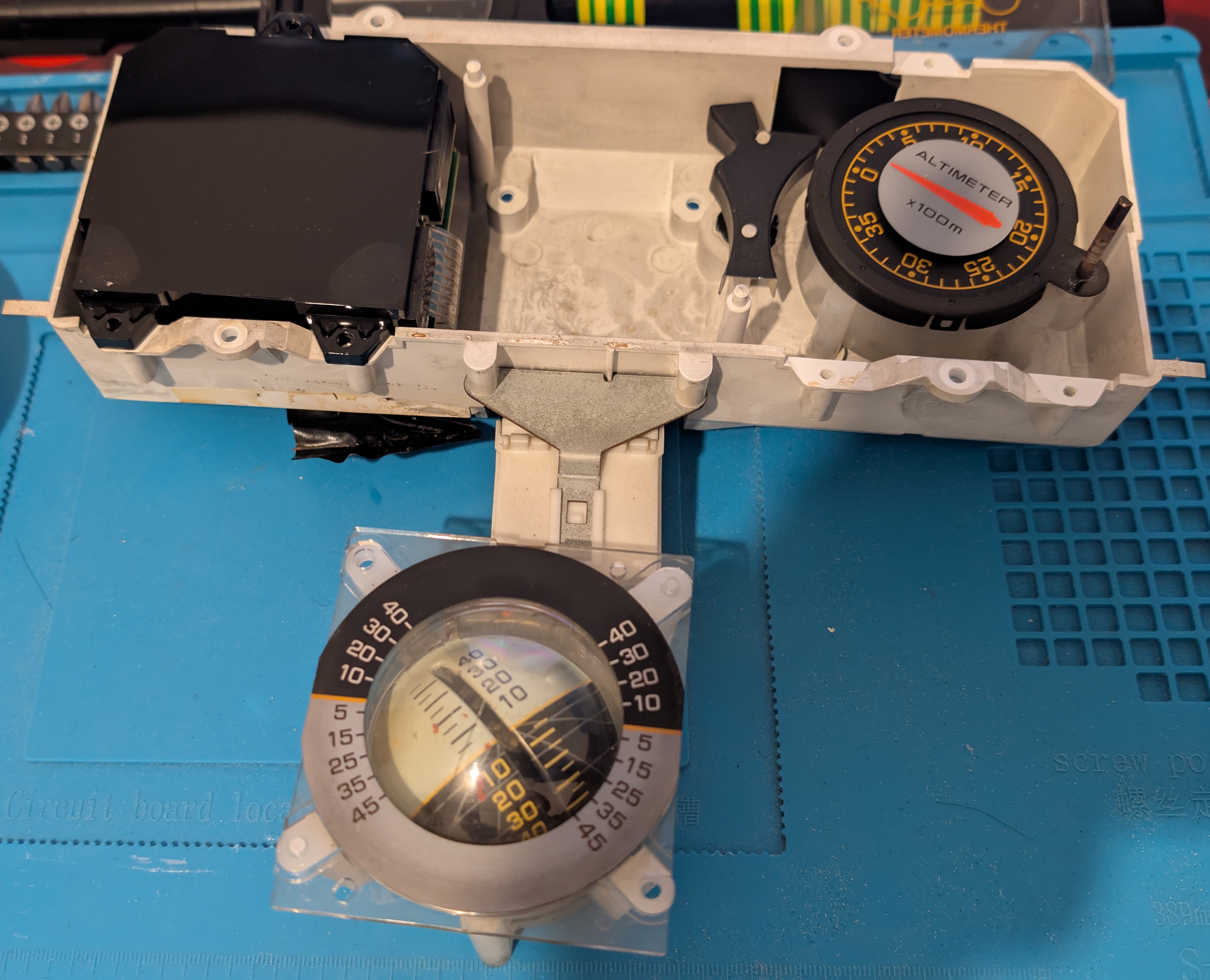
Mounting Space
I needed to design a bracket that:
- Secures the touchscreen flush with the bezel
- Allows for a power-supply board on the back
- Still allows for cable routing and access to the board IO on the back
- Can be dissasembled (no glue)
Design Link to heading
The final design is a three-part bracket. The first part is the main mounting plate, which attaches to the dashboard and uses the inclinometer poka-yoke mounting features to the bezel and dashboard, the second part is the backplate where I mount the power supply board, and the third is a cover that secures the power supply board to the backplate. Of course, the design went through a lot of iterations; here I only show the final version, but just as a hint, the last front plate file is saved as version 15 while the power supply holder shows version 20 😄.
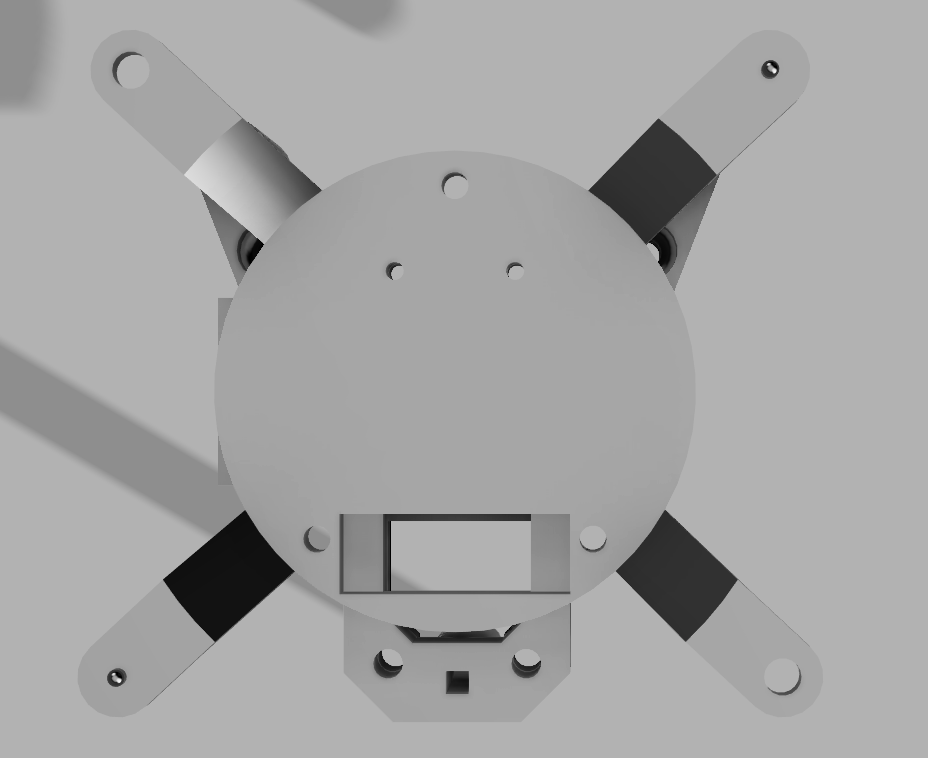
Front plate
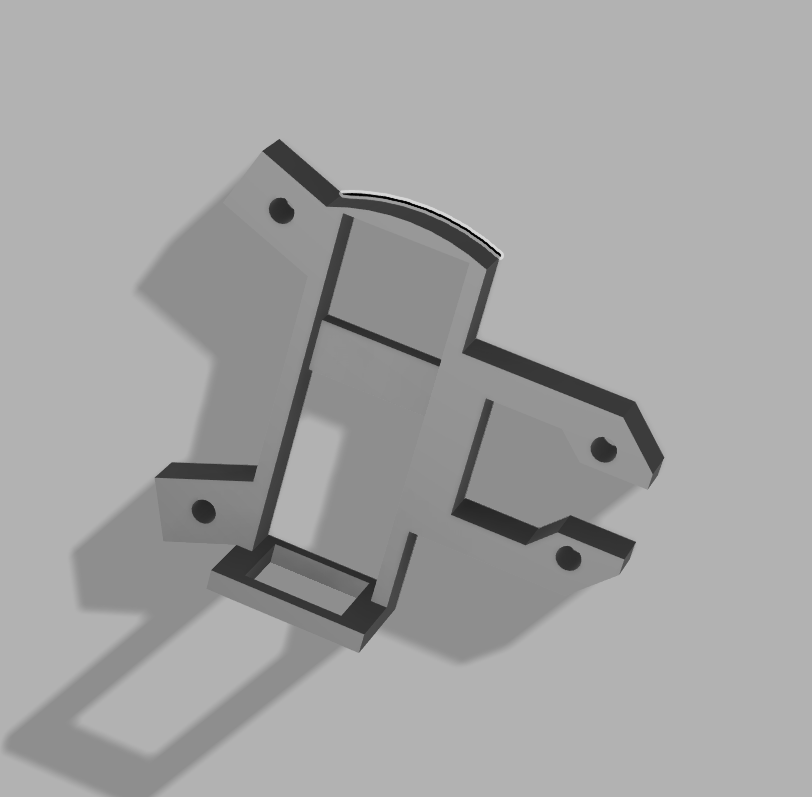
Power supply cover
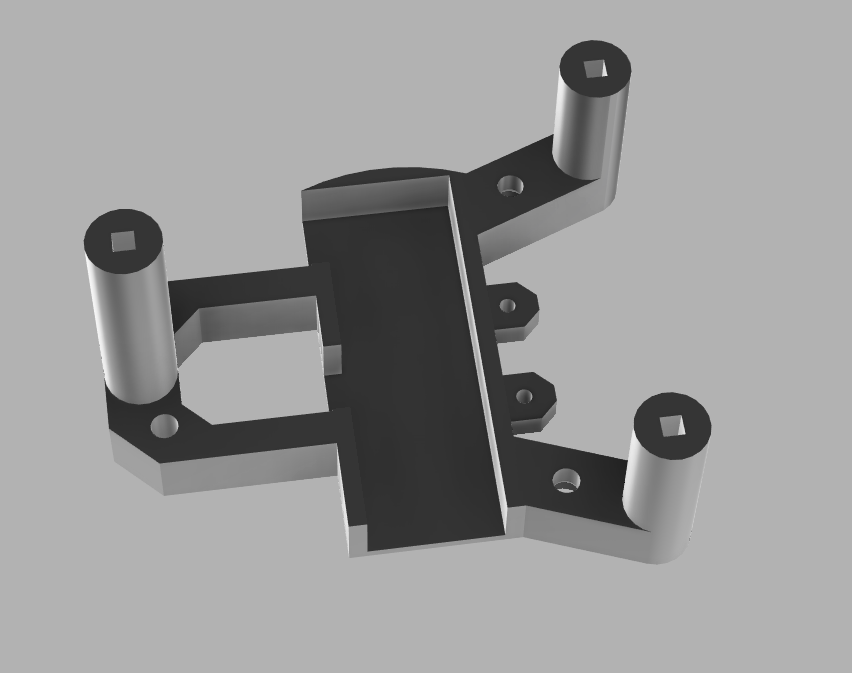
Power supply holder
3D Print Link to heading
As a prototype, I printed the parts in PLA, using 15% infill and organic supports for the overhangs. This is how it looks when everything is assembled
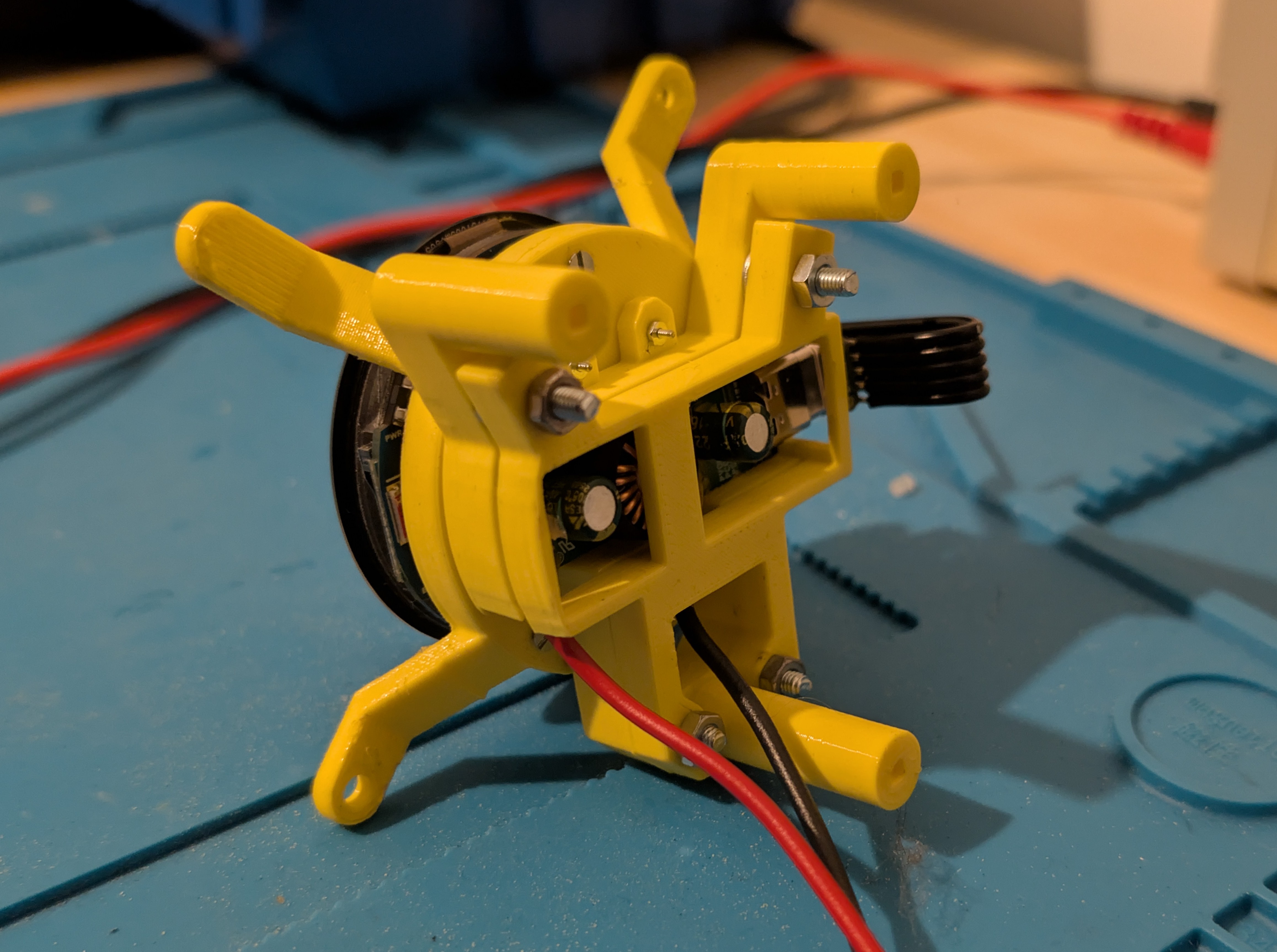
Assembled 3D Print
Installed into the housing:
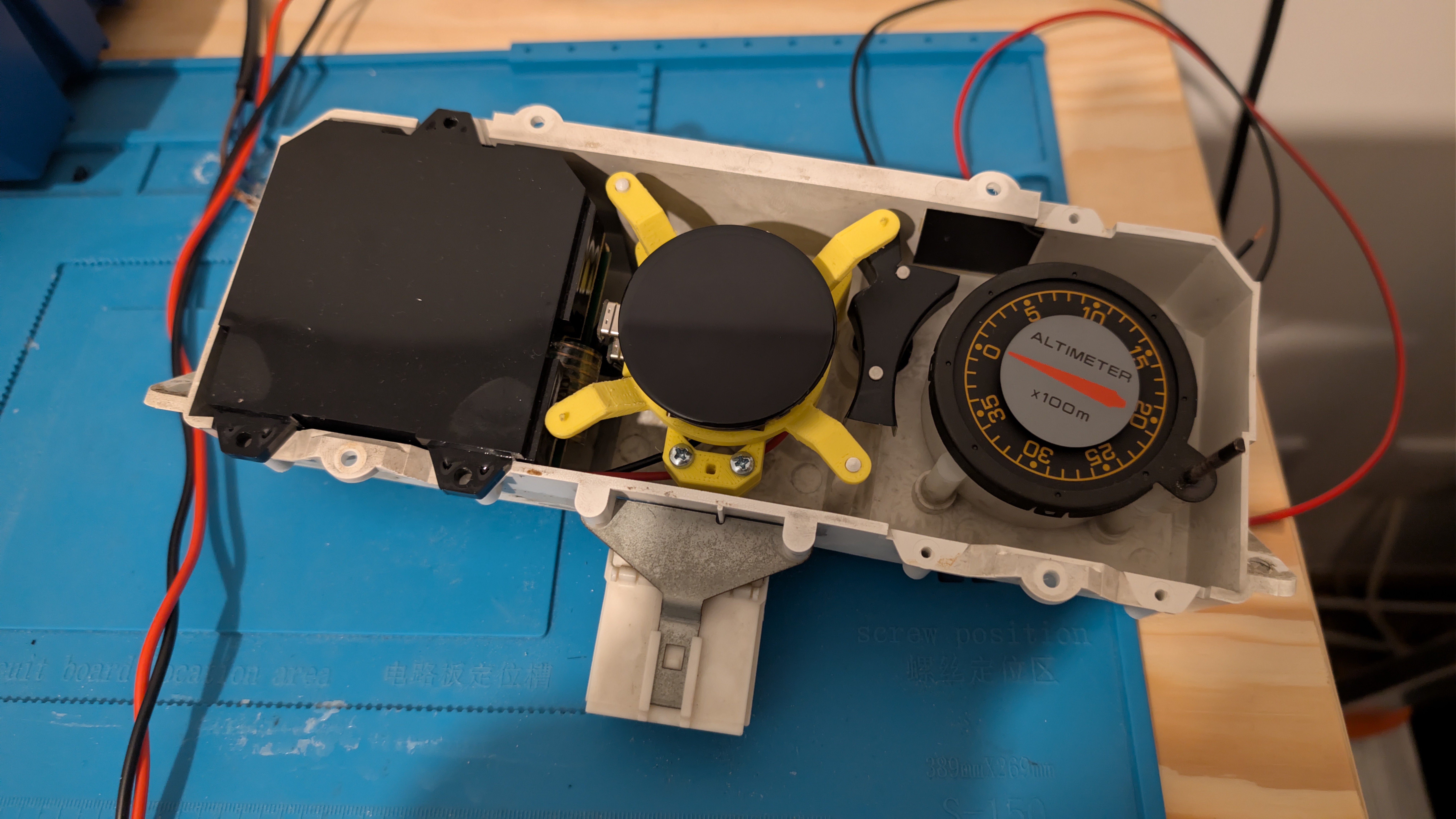
Assembled in the housing
And finally with the bezel in front
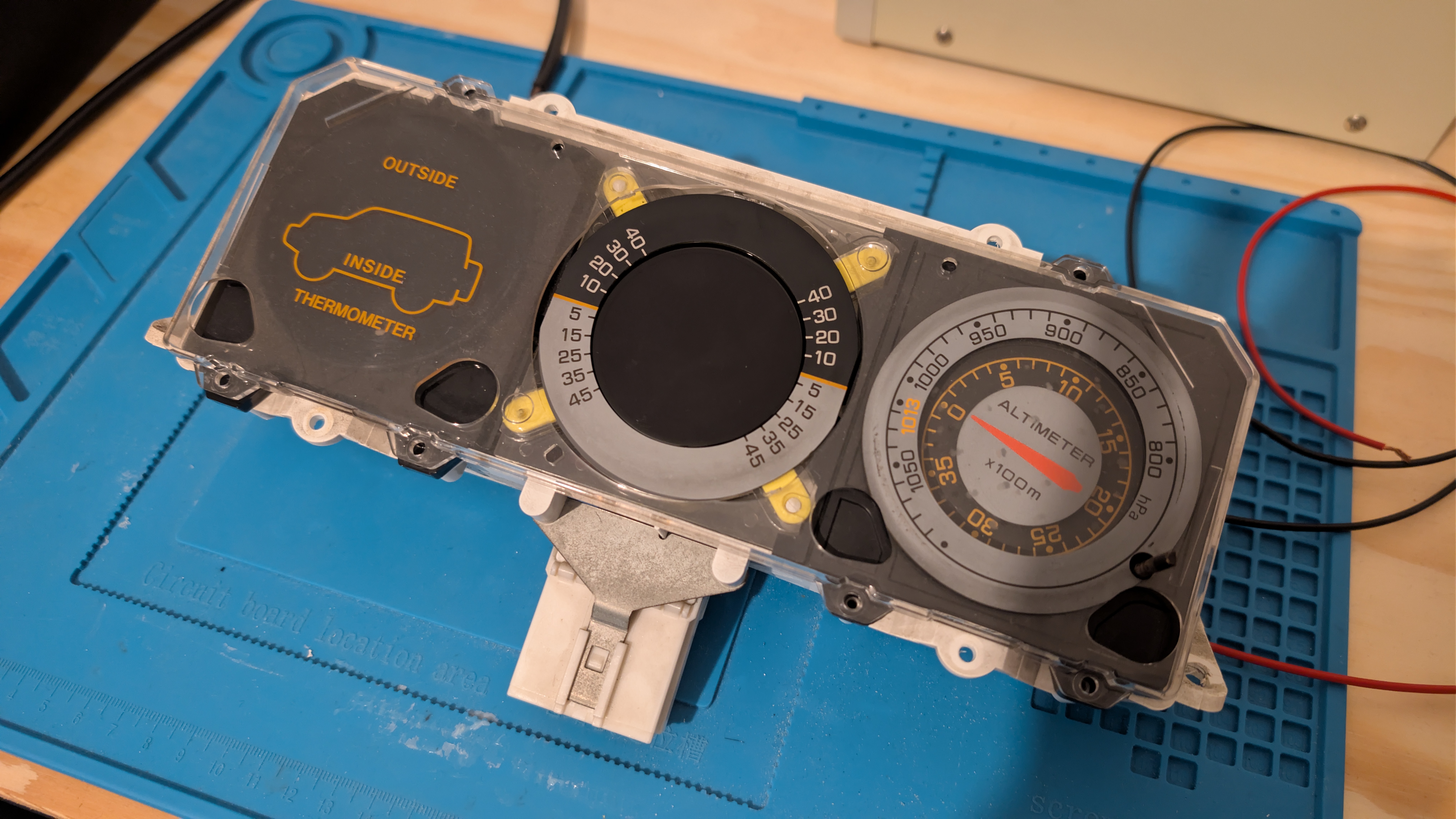
Assembled 3D Print with Bezel
Power & Electrical Architecture Link to heading
Power Strategy Link to heading
The touchscreen integrates with the vehicle’s existing 12V power infrastructure:
Cable Routing: I want any circuits I add to the car to interfere as little as possible with the existing wiring, so I decided to grab power from the cigarette lighter socket, which meant routing the power supply cable through the entire back of the central console to reach the back of the cigarette lighter socket. I don’t have pictures of the cable routing, unfortunately. But it’s easy, trust me 😄.
Conclusion Link to heading
As expected, these types of projects are never really finished; there are always improvements to be made, features to be added and bugs to be fixed.
Bugs and known issues Link to heading
- Occasional screen reset: For some reason, I saw I was getting some resets of the entire board from time to time, I suspect it is related to the WiFi manager. Keep in mind that this has a far lower rate of occurrence than the previous issues I had with the previous prototypes.
- Roll and pitch calculation: The current implementation assumes the pitch is calculated based on the screen orientation, but the screen is mounted at a ~20-degree angle, so I will have to adjust the calculations to account for that, I will probably add a calibration procedure to allow the user to zero out the roll and pitch.
Next Work Packages Link to heading
- Dual-axis tilt: Add gyroscope data for dynamic roll rate calculation (currently static accel-only)
- Bluetooth Connection: Enable the ESP32-S3 Bluetooth stack for smartphone and radio connectivity (diagnostics, music control).
- Logging to SD card: The board already has an SD card slot, I don’t have a use for it at the moment, but its something I will take into consideration.
- Update the bracket: The current bracket is made in PLA, which is not the best material for a car, I will probably make a new one in ABS, PETG or even ASA, which are more resistant to heat and UV.
- OTA updates: The OTA updater is already implemented, but it expects a static IP; I want to make it so that I can update it either from my GitHub Pages or straight from the repo.
- Other things: I will probably add some other features I come up with, as this is a project that I will keep developing and I’m doing it for fun — scope creep is expected.
Conclusion Link to heading
Hope you enjoyed this write-up; it was a long one but to be fair, I started with this idea roughly one year ago (check my first post).
For contributors: Fork the repository, propose enhancements via pull request, Im open to any improvements.
The platform is ready for the next chapter.
Last updated: March 16, 2026 Repository: GitHub - CarTouchScreenMiniDisplay_ESP32S3
3D Models: Printables - Mitsubishi Pajero MK2 Inclinometer Dashboard Replacement
If you found this project useful, consider supporting my work: ☕ Buy me a coffee